Every color in the shop frontend is a color token, and every token comes
from Figma. UX assigns color variables to a component in Figma, the Figma
transformer reads them from the component's showcase and writes a
<component>.colors.generated.ts next to the component. Code never
defines a color by hand; it imports the generated tokens.
#Color themes
A token carries one value per theme: galaxus-light, galaxus-dark,
digitec-light and digitec-dark. The portal is decided by the host, the
shade by the visitor: the shop's settings menu offers light, dark and
system, and useThemeShade from @blocks/theme exposes the choice.
Light is the default; a plain galaxus or digitec means the light theme.
#Global color tokens
Most tokens belong to one component. A few are used across the whole
frontend and are generated globally from @blocks/theme.
- Token name
TEXT#000#fff#000#fffTEXT_SECONDARY#0009#fffb#0009#fffbTEXT_TERTIARY#0004#fff4#0004#fff4BACKGROUND#fff#111#fff#111DELIMITER#ddd#444#dee#556FOCUS_VISIBLE_OUTLINE#07c#7cf#059#6bfOVERLAY_BACKGROUND#fff#222#fff#222
#Backdrop color tokens
Backdrops of modals.
- Token name
BACKGROUND#0008#000b#0008#000b
#Overflow gradient color tokens
Fades at the edges of scrollable areas.
- Token name
OVERLAYBACKGROUND_BOTTOMlinearlinearlinearlinearOVERLAYBACKGROUND_LEFTlinearlinearlinearlinearOVERLAYBACKGROUND_RIGHTlinearlinearlinearlinearOVERLAYBACKGROUND_TOPlinearlinearlinearlinearPAGEBACKGROUND_BOTTOMlinearlinearlinearlinearPAGEBACKGROUND_LEFTlinearlinearlinearlinearPAGEBACKGROUND_RIGHTlinearlinearlinearlinearPAGEBACKGROUND_TOPlinearlinearlinearlinear
#Component color tokens
Each design-system component shows its tokens on its own documentation page, under the Code tab.
#Generating color tokens
#1. The showcase in Figma
The generator reads a showcase frame, which the "Generate showcase" Figma plugin renders from the component in all four modes. Before generating:
- the component is built with Figma variables; colors come from variables, not from hard-coded values or styles
- semantic variables (for example
text-body-primary) are preferred over primitives, so the generator resolves all brands and modes from one Galaxus Light design
For the Figma side, ask your UX designer or read the Figma guides in Confluence.
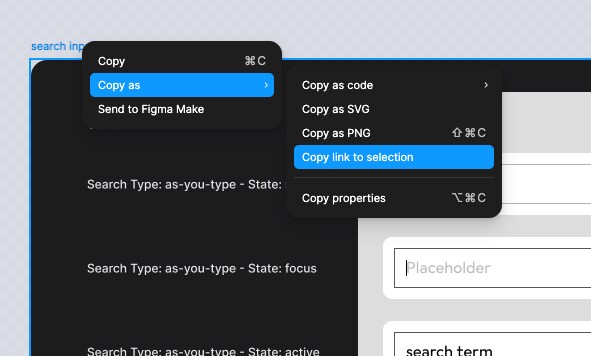
Right-click the showcase frame and choose Copy link to selection. Link the
showcase, not the component set: a set URL still generates, but every token
is marked @deprecated because the colors can't be resolved per mode.
#2. Add FIGMA_COLORS to the component's Figma config
The config of a component lives in <component>.figma.ts next to
<component>.tsx; the file is described in
Figma Code Connect. Its FIGMA_COLORS export holds the color
config:
import { getFigmaColorConfig } from "@blocks/theme/figmaColors";
import { defineFigmaConfig } from "@blocks/theme/figmaConfig";

export const FIGMA_COLORS = {
  figmaUrl:
    "https://www.figma.com/design/b1IDF5NSi7iiyRCrwClj34/?node-id=26197-507",
};

export const getFigmaConfig = () =>
  defineFigmaConfig({ colors: getFigmaColorConfig(FIGMA_COLORS) });
figmaUrl: null means custom tokens only, without Figma.
#3. Run the generator
# one package
yarn figma:colors @blocks/ui

# or one directory
yarn figma:colors <folder of the config>
The command asks which configs to process, fetches the showcases from Figma and writes three files per component, all of which are committed:
<component>.colors.generated.ts: the tokens__figma__/<component>ColorsMeta.generated.json: the token table for the documentation__figma__/<component>FigmaCache.generated.br: the Figma response, so the tokens can be regenerated without Figma
The Figma token comes from Azure Key Vault; the command offers to run
az login when needed.
yarn designsystem:colors regenerates all tokens from the caches without
talking to Figma. CI runs it and fails when the result differs from what
is committed, so always commit all three files together.
#4. Use the tokens
import { linkColors } from "./link.colors.generated.ts";

const linkTextStyle = () => css`
  color: ${linkColors.TEXT};
`;
#How tokens are named
The object is <component>Colors. Each token name is built from the layer
and the variant properties of the showcase component, upper-cased and
joined with _:
- a fill on a frame, rectangle or component becomes
BACKGROUND, a strokeBORDER, a drop shadowSHADOW, a text layerTEXT - the layer name is prepended for nested layers (
ICON_BACKGROUND) - variant properties are appended by value:
state=hovergives_HOVER. The valuesdefault,enabled,light,normalandstandardare dropped, a boolean oryesadds the property name, a number adds name and value (SIZE16) - when two layers produce the same name, the parent layer path is prepended to the second one; a number is the last resort
So two text layers both called "Text" don't tell the developer much.
Naming layers after their role (Label, Help text) gives readable tokens.
#Options
Everything in FIGMA_COLORS besides figmaUrl is optional. The types and
defaults are documented in @blocks/theme/figmaColors.
| Option | Effect |
|---|---|
output | Formats to write, default ["TypeScript"]. "iOS" and "Android" write the native app artifacts of the webview domain. |
options.interpretText | Use the content of text layers for the token name, for showcases that label their colors in text. Default false. |
options.mapTokenName | (tokenName) => boolean | string: false drops the token, a string renames it. Annotate the parameter, the callback has no contextual type outside the call. |
options.parseChildComponents | Also read colors from nested component instances, see below. Default false. |
options.portalRelationship | "join" (default) keeps both portals in one token, "mirror" copies Galaxus to Digitec, "separate" creates one token per portal. |
overrides | Replace single theme values of generated tokens. |
customTokens | Add tokens the showcase doesn't have, with a value for all four themes. |
#Child components
Nested instances are ignored by default. With parseChildComponents the
generator asks which instances to read and a short name for each, because
their full names would make the tokens unreadable. The answer is stored in
the meta file, so the non-interactive run in CI works; when the instances
change in Figma, run the generator interactively again.

#Custom tokens and overrides
Both disconnect code from Figma, so think twice. Values are colors as CSS
understands them: hex, rgb() or hsl(), also inside a longer value like
a shadow. Names of palette tokens are not resolved.
export const FIGMA_COLORS = {
  figmaUrl:
    "https://www.figma.com/design/b1IDF5NSi7iiyRCrwClj34/?node-id=26197-507",
  overrides: {
    BORDER: { "galaxus-dark": "#ffffff4d", "digitec-dark": "#ffffff4d" },
  },
  customTokens: {
    FOCUS_RING: {
      "galaxus-light": "#007bc7",
      "galaxus-dark": "#72c7f9",
      "digitec-light": "#00559d",
      "digitec-dark": "#65b6fb",
    },
  },
};
#IDE support
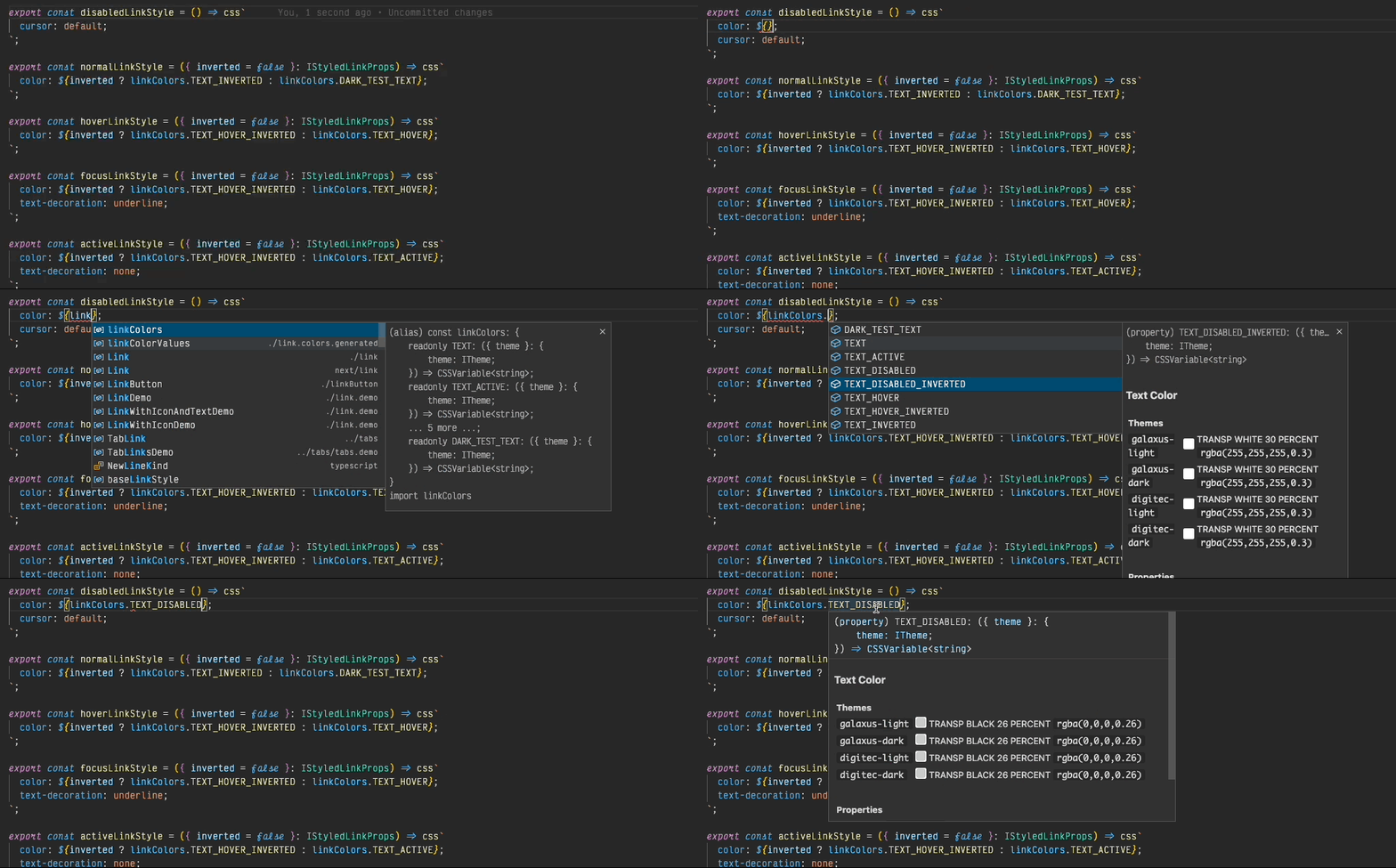
The generated file documents every token with its four values, so the IDE shows them on hover.
#When the showcase disappears
Showcases are regenerated by the plugin and get new node ids. The cache
keeps the tokens working, but the colors can't be updated until the URL is
repointed. The teamdebt rule deadFigmaLinks reports such configs to the
owning team.